Blanco Kays Corgiat Eyecare
  • Home
  • Forms
  • About
  • Order Contacts
  • Morris Patient Portal
  • SV Patient Portal
  • Low Vision
  • More
    • Home
    • Forms
    • About
    • Order Contacts
    • Morris Patient Portal
    • SV Patient Portal
    • Low Vision
Blanco Kays Corgiat Eyecare
  • Home
  • Forms
  • About
  • Order Contacts
  • Morris Patient Portal
  • SV Patient Portal
  • Low Vision

Low Vision Devices: A Guide to the Tools That Can Help You See Better

Low vision doesn’t mean “no vision.” It means that even with the best regular glasses or contact lenses, everyday tasks like reading, recognizing faces, or watching television remain difficult. The good news is that a wide range of low vision devices can make a real difference in daily life.


At Blanco Kays Corgiat Eyecare, we have special expertise in low vision care. Our doctors evaluate your remaining vision and help match you with the right tools so you can stay independent and confident.


Here’s a clear overview of the most common types of low vision devices:
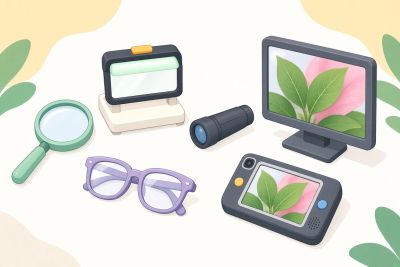

Illustration of nature observation tools displaying a leaf on screens.

1. Handheld Magnifiers

These are the simplest and most portable options.


  • What they are: Small magnifying glasses you hold in your hand.
  • Best for: Reading labels, menus, mail, or short passages.
  • Features to look for: Built-in LED lights, different magnification strengths (usually 2x–10x), and comfortable grips.
  • Pros: Inexpensive, easy to carry, no training needed.
  • Cons: Can be tiring for longer reading sessions.



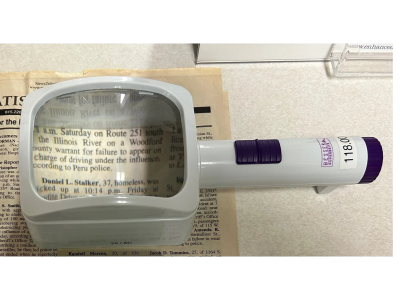
2. Stand Magnifiers

These sit on the page so you don’t have to hold them.


  • Best for: Longer reading (books, newspapers, magazines).
  • Features: Often include built-in lighting and a fixed focus distance.
  • Pros: Reduce hand fatigue; very stable.
  • Cons: Less portable than handheld versions.

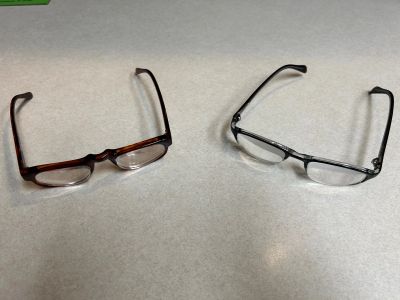
3. Spectacle-Mounted Magnifiers (High-Power Reading Glasses)

These look like regular glasses but contain much stronger lenses.


  • Best for: Hands-free near tasks such as reading or writing.
  • Pros: Leave your hands free; more natural for some people.
  • Cons: The stronger the magnification, the closer you need to hold material, and the smaller the field of view.


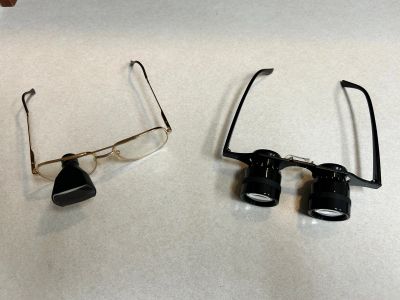
4. Telescopic Devices

These help with distance vision.


  • Types: Hand-held monoculars or binoculars, or spectacle-mounted telescopes.
  • Best for: Watching television, recognizing faces across a room, reading street signs, or seeing the board in a classroom.
  • Pros: Bring distant objects closer.
  • Cons: Can take practice to use smoothly; limited field of view.


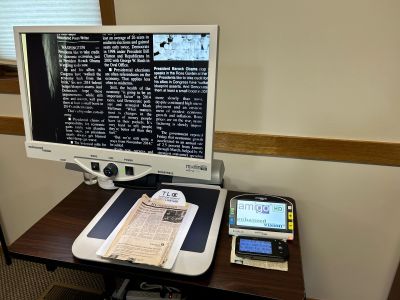
5. Electronic (Video) Magnifiers

These are among the most powerful modern tools.


  • Desktop electronic magnifiers: A camera projects a magnified image onto a screen. You can adjust magnification, contrast, and color.
  • Portable electronic magnifiers: Smaller handheld or foldable versions you can take to restaurants or stores.
  • Best for: Reading books, bills, medication labels, or anything with fine print.
  • Pros: Very high magnification, adjustable contrast (helpful for macular degeneration), and freeze-frame options.
  • Cons: More expensive than optical magnifiers.
6. Screen Magnification and Accessibility Software

For computers, tablets, and smartphones.


  • Built-in features on most devices (Zoom, Magnifier, VoiceOver, TalkBack).
  • Specialized software that enlarges everything on the screen or reads text aloud.
  • Best for: Email, online banking, reading websites, and staying connected digitally.

7. Specialized Lighting and Non-Optical Aids

Sometimes the simplest tools help the most:


  • Task lighting with adjustable brightness and color temperature
  • Bold-lined paper and thick-tip pens
  • Large-print books, clocks, and phone dials
  • Talking watches, scales, or medication organizers
  • Tinted filters or absorptive lenses that reduce glare

How We Help at Blanco Kays Corgiat Eyecare

Choosing the right low vision device is not one-size-fits-all. It depends on:


  • The type and degree of your vision loss
  • The specific tasks that are hardest for you
  • Your lifestyle and preferences
  • Whether you need help with near vision, distance vision, or both


During a low vision evaluation, we assess your remaining vision, discuss your goals, and demonstrate different devices so you can try them in real time. Our goal is to find solutions that actually fit your daily life.

Ready to Explore Your Options?

If regular glasses are no longer enough and everyday tasks feel harder, a low vision evaluation may help.  Dr. Blanco and Dr. Corgiat are available for low vision appointments at either of our convenient locations.


Spring Valley Location
200 West Dakota Street, Spring Valley, IL 61362
(815) 663-8281


Morris Location
1802 Division Street, Suite 205, Morris, IL 60450
(815) 942-3042


Contact us to schedule a low vision consultation. We’re here to help you make the most of the vision you have.

  • Morris Patient Portal
  • SV Patient Portal

Blanco Kays Corgiat Eyecare

Copyright © 2026 Blanco Kays Corgiat Eyecare - All Rights Reserved.

This website uses cookies.

We use cookies to analyze website traffic and optimize your website experience. By accepting our use of cookies, your data will be aggregated with all other user data.

DeclineAccept